

Video Editor & Maker - InShot
InShot Video Editor
Installs
500,000,000+
Developer
InShot Video Editor
-
Category
Video Players & Editors
-
Content Rating
Rated for 3+
Developer Email
Privacy Policy
http://inshotapp.com/website/InShotAndroid/privacypolicy.html
Screenshots
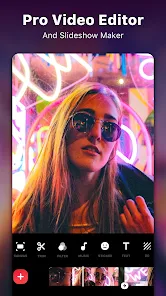
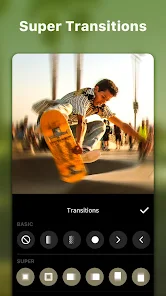

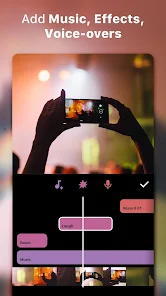
Expert Review
InShot is a video editing app that's become my go-to tool for quick edits on my phone. It's basically a mobile studio that lets you trim clips, add music, text, and filters to make videos for social media or just for fun. The app first launched a few years back and you can easily find it on the Google Play Store or the Apple App Store. It's racked up hundreds of millions of downloads, which shows how popular it is. You can download and install it for free, and you don't even need to register an account to start using it right away. That instant access is a big plus. Of course, like many free apps, it has some in-app purchases to unlock extra features and there are occasional ads, but the core editing tools are completely free to use.
Using InShot is pretty straightforward. I usually import a video, chop out the parts I don't want, and then play around with the music library or add some text overlays. A handy tip is to use the 'Canvas' feature to change the video aspect ratio for different platforms like Instagram or TikTok without cropping the important stuff. The controls are intuitive, so you don't need to be a pro to figure it out. I find myself using it for everything from making fun clips for friends to editing short videos for my personal projects.
When I was looking for a video editor, I tried a few others like KineMaster and CapCut. KineMaster felt a bit more professional but also more complicated for everyday use. CapCut is also great and has trendy templates, but sometimes it feels geared more towards specific social media trends. I stuck with InShot because it strikes the best balance for me. It's powerful enough for what I need but doesn't overwhelm me with too many complex options. It feels like a tool designed for regular users who just want to make their videos look good without a steep learning curve. For quick, clean edits on the fly, this app is my top choice.
Key Functional Highlights
- 🎬 All-in-One Simplicity: Unlike some editors that separate functions, InShot bundles trimming, splitting, adding music, text, and filters into one clean interface. Compared to a popular app like Adobe Premiere Rush, which can feel a bit heavy for mobile, InShot keeps everything light and fast, perfect for quick social media edits.
- 📱 Optimized for Mobile Sharing: A standout feature is how it's built for mobile-first creation. The export settings are pre-optimized for platforms like Instagram, YouTube, and TikTok right within the app. You don't need to fiddle with confusing resolution settings; it guides you to the best format for each platform after you install it.
- 🎵 Integrated Music & Sound Effects: The app comes with a decent built-in library of free music and sound effects, which is a huge time-saver. While other apps might require you to download audio separately, InShot lets you browse and add tracks directly within your project, streamlining the whole editing process.
- ✂️ Precise & Easy Trimming Tools: The timeline editor is surprisingly responsive. Pinching to zoom on the timeline for frame-accurate cuts feels natural. For a free app you download from Google Play, the precision you get here is often better than what you find in many other basic mobile editors.
Advantages & Benefits
- 👍 User-Friendly Interface: The layout is incredibly intuitive. Compared to more complex apps like PowerDirector, InShot gets you editing within seconds without any tutorials.
- 👍 Free Core Features: The amount you can do without paying is impressive. Apps like VivaVideo often watermark heavily or lock basic features behind a paywall, but InShot's free version is genuinely usable.
- 👍 Regular Updates & New Elements: The developers frequently add new stickers, fonts, and filters, keeping the app feeling fresh compared to some similar apps that stagnate.
Areas for Improvement
- 👎 Persistent Ads: The free version shows full-screen video ads between edits, which can disrupt your workflow. Apps like CapCut have a less intrusive ad model in their free tier.
- 👎 Limited Advanced Features: For complex edits like multi-layer keyframing or color grading, it falls short against prosumer apps like LumaFusion.
- 👎 Watermark on Some Exports: While basic exports are clean, using certain premium filters or features in the free version can add a watermark, which apps like Apple's iMovie don't do.
Recommended Apps
![]()
ZEPETO: Avatar, Connect & Play
Naver Z Corporation4.3
![]()
Reverse Voice: Flip Singing
NindaFuit0![]()
AI Chat Ask Assistant - NowAI
Now Tech4.3![]()
Lie Detector Test: Prank App
DkTech inc.4.3![]()
Peachy - AI Face & Body Editor
InShot Video Editor4.8
![]()
AI Video Art Creator - Livensa
FERASET4.5![]()
Google Voice
Google LLC4.3![]()
Horoscopes & Tarot
Astrolis Horoscopes4.7![]()
eBay online shopping & selling
eBay Mobile4.6![]()
JPay
Jpay Mobile4.1![]()
Stranger Things 5 Challenges
MVH Entertainment Team5![]()
Chat Master: Prank Story
ABI Game Studio4.8![]()
Google Maps
Google LLC4.2![]()
AI Chat・Ask Chatbot Assistant
AI Chat Studio4.5![]()
Name Meanings with Impact
Alif Innovative Solution3.7















You May Like
-
![]()
True Tarot Card Reading
KaApps4.2 -
![]()
LinkedIn: Jobs & Business News
LinkedIn4.2 -
![]()
iControl: Easy Widgets Themes
Fancy keyboard for theme apps4.6 -
![]()
Duolingo: Language & Chess
Duolingo4.7 -
![]()
Flipped:Chat with AI Character
First Group pte ltd4.1 -
![]()
Hearing Age
Mobile Solutions Tech0 -
![]()
TikTok
TikTok Pte. Ltd.4.4 -
![]()
Pretty Makeup - Beauty Camera
Photo Editor Perfect Corp.4.4 -
![]()
PhotoRoom AI Photo Editor
PhotoRoom Background Editor App4.7 -
![]()
Lightleap by Lightricks
Lightricks Ltd.4.3 -
![]()
Name Meaning
Dexati4.1 -
![]()
Truth Social
T Media Tech LLC3.3 -
![]()
Ace Hardware
Ace Hardware Corporation4.7 -
![]()
Kpop Fans Demon Hunter Wallpap
JHNStudio4.3 -
![]()
Artplay - AI Photo & Video
Hideaway Technology Limited4.5









































