

Find Your Phone By Clap
Trusted App Global
Installs
10M+
Developer
Trusted App Global
-
Category
Productivity
-
Content Rating
Everyone
Developer Email
Privacy Policy
https://sites.google.com/view/trustedappglobal
Screenshots
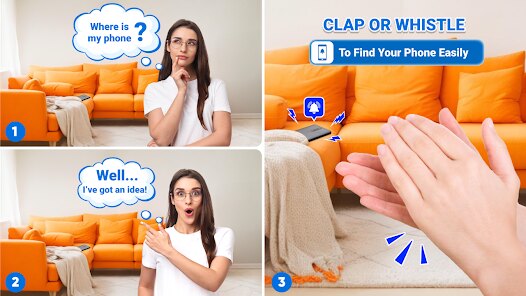
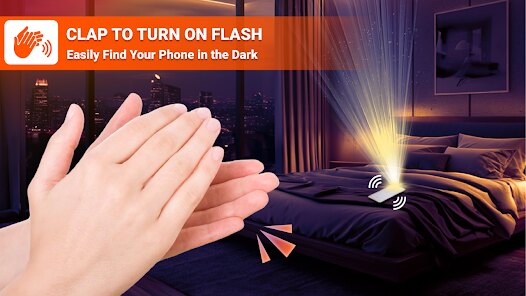
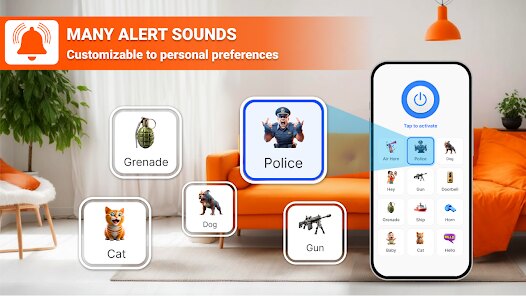
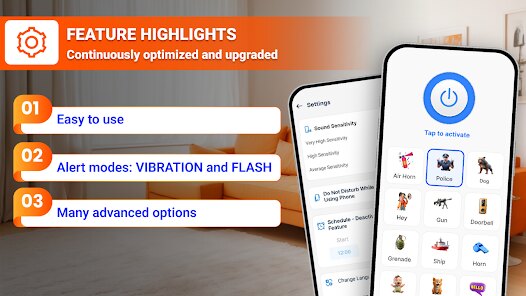
Expert Review
I've been using the 'Find Your Phone By Clap' app for a while now, and it's honestly a lifesaver for someone as forgetful as me. This app, as the name suggests, is a utility tool designed to help you locate your misplaced Android phone simply by clapping your hands. It's a clever solution for those frantic moments when you've left your phone buried under a pile of laundry or slipped between the couch cushions. I first downloaded it from the Google Play Store a couple of years ago, and it's been steadily gaining popularity since its launch. The app has racked up millions of installs, which isn't surprising given how handy it is. The best part? It's completely free to download and install. You don't even need to register an account to start using it, which I really appreciate for a simple tool like this. There are no annoying in-app purchases to worry about, and while there are occasional ads, they're pretty unobtrusive and don't get in the way of the core function.
Using the app is a breeze. After you install it, you just need to enable the accessibility service it requires to listen for your clap. Once that's set up, you're good to go. The trick is to clap loudly and clearly – two sharp claps usually do the trick. When the app's microphone picks up the sound, your phone will immediately start ringing at full volume, even if it's on silent or vibrate mode. A little tip I've learned is to make sure the app is running in the background and that your claps are distinct. Sometimes in a noisy room, it might not catch the sound, so I try to clap near where I think the phone might be. It's become a reflex for me now whenever my phone goes missing.
There are other similar apps out there, like 'Find My Device' by Google or various 'Whistle to Find Phone' apps. I've tried a few, but I keep coming back to 'Find Your Phone By Clap'. Google's solution is more comprehensive for remote tracking, but it requires an internet connection and setup. For a quick, offline, physical search in your own home, the clapping method feels more intuitive and immediate than whistling or using another device. The simplicity of this app is its biggest draw. It does one job, and it does it very well without any fuss. Other apps in this genre often come with extra features I don't need, which can complicate the interface. For a straightforward problem – finding a lost phone in the house – this is the most direct and reliable app I've found on Google Play.
Key Functional Highlights
- 🔊 Instant Audible Response: Unlike some locator apps that use flashing lights, this app makes your phone ring loudly the moment it hears your clap. This is perfect when your phone is out of sight, as the sound guides you right to it, even from another room.
- 🛡️ Works Offline & On Silent: A standout feature is that it doesn't need an internet connection or Wi-Fi to function. It also overrides your phone's silent profile, so you'll always hear the ringtone. This gives it a clear edge over cloud-based finder services.
- 🤖 Simple Accessibility Integration: The setup is straightforward through Android's accessibility settings. Once enabled, the app stays reliably active in the background, ready to listen, without draining your battery excessively like some similar tools.
- 🎯 Minimalist, Purpose-Built Design: The app's interface is clean and focused solely on the clap detection function. It lacks the cluttered maps or account dashboards of apps like Google's Find My Device, making it faster to use in a moment of panic.
Advantages & Benefits
- 👍 Zero-Cost Convenience: Being completely free with no paywalls for the core feature is a huge strength. Many utility apps in this genre push subscriptions or paid upgrades, but this one delivers its promise without any charge.
- 👍 Faster Than Voice Assistants: Trying to use "Hey Google" or "Okay Google" to find your phone often fails if the microphone isn't sensitive enough. Clapping is a more universal and reliable sound trigger that works every time.
- 👍 Less Setup Than Alternatives: Compared to setting up device administrators for 'Find My Device' or linking accounts for other finder apps, installing this and granting one permission is all you need. It's plug-and-play.
Areas for Improvement
- 👎 Limited to Close Range: The app only works if you're within earshot of your phone. For phones lost outside the home, a service like Google's Find My Device, which uses GPS, is far more effective.
- 👎 Can Be Tricked by Noise: In very loud environments with similar sharp sounds, it might trigger accidentally. Some competing apps offer a customizable sound trigger (like a specific whistle pattern) for better accuracy.
- 👎 Android-Only: This is a limitation of the app's genre, but it's only available on Google Play. iPhone users would need to look for a different solution entirely in the App Store.
Recommended Apps
![]()
ZEPETO: Avatar, Connect & Play
Naver Z Corporation4.3
![]()
Reverse Voice: Flip Singing
NindaFuit0![]()
AI Chat Ask Assistant - NowAI
Now Tech4.3![]()
Lie Detector Test: Prank App
DkTech inc.4.3![]()
Peachy - AI Face & Body Editor
InShot Video Editor4.8
![]()
AI Video Art Creator - Livensa
FERASET4.5![]()
Google Voice
Google LLC4.3![]()
Horoscopes & Tarot
Astrolis Horoscopes4.7![]()
eBay online shopping & selling
eBay Mobile4.6![]()
JPay
Jpay Mobile4.1![]()
Stranger Things 5 Challenges
MVH Entertainment Team5![]()
Chat Master: Prank Story
ABI Game Studio4.8![]()
Google Maps
Google LLC4.2![]()
AI Chat・Ask Chatbot Assistant
AI Chat Studio4.5![]()
Name Meanings with Impact
Alif Innovative Solution3.7















You May Like
-
![]()
True Tarot Card Reading
KaApps4.2 -
![]()
LinkedIn: Jobs & Business News
LinkedIn4.2 -
![]()
iControl: Easy Widgets Themes
Fancy keyboard for theme apps4.6 -
![]()
Duolingo: Language & Chess
Duolingo4.7 -
![]()
Flipped:Chat with AI Character
First Group pte ltd4.1 -
![]()
Hearing Age
Mobile Solutions Tech0 -
![]()
TikTok
TikTok Pte. Ltd.4.4 -
![]()
Pretty Makeup - Beauty Camera
Photo Editor Perfect Corp.4.4 -
![]()
PhotoRoom AI Photo Editor
PhotoRoom Background Editor App4.7 -
![]()
Lightleap by Lightricks
Lightricks Ltd.4.3 -
![]()
Name Meaning
Dexati4.1 -
![]()
Truth Social
T Media Tech LLC3.3 -
![]()
Ace Hardware
Ace Hardware Corporation4.7 -
![]()
Kpop Fans Demon Hunter Wallpap
JHNStudio4.3 -
![]()
Artplay - AI Photo & Video
Hideaway Technology Limited4.5










































