

Glam AI: Video & Photo Editor
Glam Labs, Inc.
Installs
Developer
Glam Labs, Inc.
-
Category
Generative AI
-
Content Rating
Teen
Developer Email
+17538456734
Privacy Policy
https://getglam.app/privacy/
Screenshots
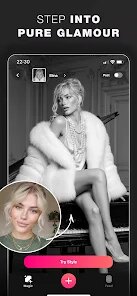
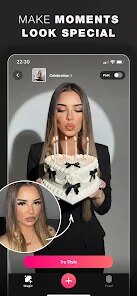

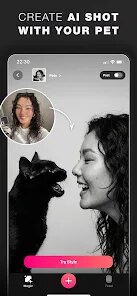

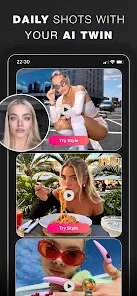
Expert Review
Video and photo editing apps are plentiful on Google Play, but Glam AI: Video & Photo Editor has carved out a noticeable space for itself. Developed by Glam Labs, Inc., this app focuses on enhancing portraits and adding artistic effects, particularly with AI-powered features that touch up faces and transform backgrounds. It's free to download and install, though like many free apps, it includes ads and offers in-app purchases for premium filters and tools. The app has garnered millions of downloads, reflecting its popularity among users who want quick, polished edits without needing professional software.
Using the app is fairly straightforward. The main interface splits editing into photo and video modes, with the AI enhancement tools prominently displayed. I found that applying a filter or adjusting skin tone is just a tap away, though the processing time varies depending on the complexity of the effect. There's also a suite of artistic options, like cartoon filters and background swaps, which require the AI to analyze the subject. In practice, these worked well with clear faces and simple backgrounds, but sometimes struggled with group shots or busy scenes, leading to slightly unnatural edges or color mismatches.
If you compare Glam AI to something like Meitu, the difference is in the approach. Glam AI leans heavily into modern, subtle enhancements rather than heavily stylized looks, which I prefer for everyday use. Another competitor, Facetune, is more focused on deep retouching, while Glam AI feels more balanced between fun effects and natural improvements. The app's design also feels cleaner, with fewer cluttered menus, though the overall experience can feel a bit slow on older devices.
Key Functional Highlights
- The AI portrait enhancement is the core feature. It analyzes facial features and applies smoothing, brightening, and color correction automatically. In use, the results are usually natural, but on occasion, the skin smoothing felt a bit too aggressive for my liking, especially in well-lit selfies.
- Background replacement is another highlight. It lets you swap out the background of any photo or video with a new scene or a solid color. Compared to similar tools, this one works more seamlessly with moving footage, though it sometimes struggles with fine details like hair strands.
- The video editing suite offers timeline-based editing with effects and music, but the free version limits export quality to 720p. This feels like a reasonable trade-off, but it's worth noting if you want higher resolution for sharing.
- Filters and templates are organized into categories, and the ones here are more polished than in many free editors. However, the selection in the free tier is noticeably smaller, and the app pushes premium options quite frequently.
Advantages & Benefits
- Editing is quick for everyday social media posts, since most features are just one or two taps away.
- The AI handles group shots better than most competitors, keeping adjustments consistent across multiple faces.
- Video editing tools are surprisingly capable for a free app, especially the background swap feature.
Areas for Improvement
- Processing can be slow on older phones, especially with video features.
- Ads appear fairly often between edits, which can interrupt the flow of work.
- Free users get limited access to premium filters, so the variety feels restricted over time.
Recommended Apps
![]()
ZEPETO: Avatar, Connect & Play
Naver Z Corporation4.3
![]()
Reverse Voice: Flip Singing
NindaFuit0![]()
AI Chat Ask Assistant - NowAI
Now Tech4.3![]()
Lie Detector Test: Prank App
DkTech inc.4.3![]()
Peachy - AI Face & Body Editor
InShot Video Editor4.8
![]()
AI Video Art Creator - Livensa
FERASET4.5![]()
Google Voice
Google LLC4.3![]()
Horoscopes & Tarot
Astrolis Horoscopes4.7![]()
eBay online shopping & selling
eBay Mobile4.6![]()
JPay
Jpay Mobile4.1![]()
Stranger Things 5 Challenges
MVH Entertainment Team5![]()
Chat Master: Prank Story
ABI Game Studio4.8![]()
Google Maps
Google LLC4.2![]()
AI Chat・Ask Chatbot Assistant
AI Chat Studio4.5![]()
Name Meanings with Impact
Alif Innovative Solution3.7















You May Like
-
![]()
True Tarot Card Reading
KaApps4.2 -
![]()
LinkedIn: Jobs & Business News
LinkedIn4.2 -
![]()
iControl: Easy Widgets Themes
Fancy keyboard for theme apps4.6 -
![]()
Duolingo: Language & Chess
Duolingo4.7 -
![]()
Flipped:Chat with AI Character
First Group pte ltd4.1 -
![]()
Hearing Age
Mobile Solutions Tech0 -
![]()
TikTok
TikTok Pte. Ltd.4.4 -
![]()
Pretty Makeup - Beauty Camera
Photo Editor Perfect Corp.4.4 -
![]()
PhotoRoom AI Photo Editor
PhotoRoom Background Editor App4.7 -
![]()
Lightleap by Lightricks
Lightricks Ltd.4.3 -
![]()
Name Meaning
Dexati4.1 -
![]()
Truth Social
T Media Tech LLC3.3 -
![]()
Ace Hardware
Ace Hardware Corporation4.7 -
![]()
Kpop Fans Demon Hunter Wallpap
JHNStudio4.3 -
![]()
Artplay - AI Photo & Video
Hideaway Technology Limited4.5











































