

Doodle Art: Magic Drawing App
Peaksel Games
Installs
5M+
Developer
Peaksel Games
-
Category
Art & Design
-
Content Rating
Rated for 3+
Developer Email
Privacy Policy
https://www.peaksel.com/privacy-policy-for-free-apps/
Screenshots
Expert Review
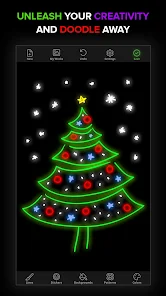
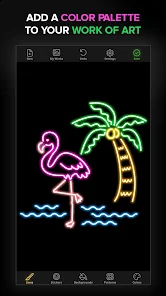
Doodle Art: Magic Drawing App is a fun, creative app from Peaksel Games that lets anyone draw and color cool pictures. It's basically a digital coloring book with a twist. You don't need any drawing skills to use it. The app launched a few years back and is super easy to find on Google Play. It's free to download and install, and it has millions of installs, which shows how popular it is. You can just open the app and start playing right away; no registration is needed. While you can use it for free, there are some ads that pop up, and there are optional in-app purchases if you want to unlock more coloring pages or get rid of the ads.
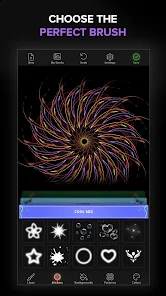
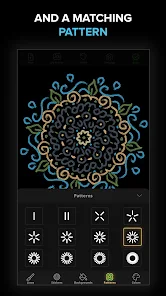
Using the app is really straightforward. You pick a picture from a huge collection – there are animals, mandalas, patterns, all sorts of things. Then, you just tap on the numbered sections to fill them with color. It's super relaxing, almost like meditation. A good tip is to start with the simpler pictures to get the hang of it. The app also lets you use different brush styles and even a magic fill tool that colors a whole section instantly. It's perfect for killing time or just unwinding.
I've tried a few other coloring apps, like Colorfy or Recolor, but I keep coming back to Doodle Art. The main reason is the sheer variety of pictures. It feels like there's always something new. Also, the interface is just cleaner and less cluttered than some others. While apps like Colorfy might have more realistic images, Doodle Art has this unique, playful style that I really enjoy. For a free app you can get on Google Play, it offers a lot of content without being complicated.
Key Functional Highlights
- 🎨 Huge Picture Library: Unlike many similar apps that have a limited free selection, Doodle Art gives you access to a massive and constantly updated collection of drawings right after you install it. You'll find everything from cute animals to intricate geometric patterns.
- 🎨 Unique 'Magic' Tools: This app goes beyond simple tap-to-fill. It has special 'magic' brushes and a one-tap fill feature that makes coloring large areas or creating gradient effects incredibly fast and satisfying, which is a standout feature in its genre.
- 🎨 Perfect for All Ages: The design is intuitive enough for kids but has enough detail and variety to keep adults entertained for hours. It's a great family-friendly app to download if you're looking for a shared creative activity.
- 🎨 Completely Offline Play: Once downloaded, you don't need an internet connection to use most of the app's features. This makes it a reliable choice for coloring on planes, commutes, or anywhere without Wi-Fi.
Advantages & Benefits
- 👍 More Free Content: Compared to Recolor, which heavily gates its best content behind subscriptions, Doodle Art offers a wider range of pictures for free right after you install the app.
- 👍 Faster and Smoother: The app runs very smoothly, even on older devices. I've found it to be more responsive and have fewer lags than something like Colorfy, especially when using the fill tools.
- 👍 Less Intrusive Ads (Initially): While it has ads, the frequency when you first start using it feels lower than in many other free apps in this genre, allowing for more uninterrupted creative time.
Areas for Improvement
- 👎 Ads Can Disrupt Flow: The free version shows full-screen video ads between pictures, which can break your concentration. Apps like Pigment offer a cleaner, ad-free experience if you're willing to pay.
- 👎 Limited Advanced Features: If you're looking for professional tools like layer support or custom color palettes, this app isn't for you. Procreate or even Adobe Fresco are in a different league for serious artists.
- 👎 Some Repetitive Designs: After a while, you might notice some patterns and themes repeating in the picture library, which isn't an issue with apps that focus on licensed art or user-generated content.
Recommended Apps
![]()
ZEPETO: Avatar, Connect & Play
Naver Z Corporation4.3
![]()
Reverse Voice: Flip Singing
NindaFuit0![]()
AI Chat Ask Assistant - NowAI
Now Tech4.3![]()
Lie Detector Test: Prank App
DkTech inc.4.3![]()
Peachy - AI Face & Body Editor
InShot Video Editor4.8
![]()
AI Video Art Creator - Livensa
FERASET4.5![]()
Google Voice
Google LLC4.3![]()
Horoscopes & Tarot
Astrolis Horoscopes4.7![]()
eBay online shopping & selling
eBay Mobile4.6![]()
JPay
Jpay Mobile4.1![]()
Stranger Things 5 Challenges
MVH Entertainment Team5![]()
Chat Master: Prank Story
ABI Game Studio4.8![]()
Google Maps
Google LLC4.2![]()
AI Chat・Ask Chatbot Assistant
AI Chat Studio4.5![]()
Name Meanings with Impact
Alif Innovative Solution3.7















You May Like
-
![]()
True Tarot Card Reading
KaApps4.2 -
![]()
LinkedIn: Jobs & Business News
LinkedIn4.2 -
![]()
iControl: Easy Widgets Themes
Fancy keyboard for theme apps4.6 -
![]()
Duolingo: Language & Chess
Duolingo4.7 -
![]()
Flipped:Chat with AI Character
First Group pte ltd4.1 -
![]()
Hearing Age
Mobile Solutions Tech0 -
![]()
TikTok
TikTok Pte. Ltd.4.4 -
![]()
Pretty Makeup - Beauty Camera
Photo Editor Perfect Corp.4.4 -
![]()
PhotoRoom AI Photo Editor
PhotoRoom Background Editor App4.7 -
![]()
Lightleap by Lightricks
Lightricks Ltd.4.3 -
![]()
Name Meaning
Dexati4.1 -
![]()
Truth Social
T Media Tech LLC3.3 -
![]()
Ace Hardware
Ace Hardware Corporation4.7 -
![]()
Kpop Fans Demon Hunter Wallpap
JHNStudio4.3 -
![]()
Artplay - AI Photo & Video
Hideaway Technology Limited4.5









































