

To Do List
Splend Apps
Installs
10M+
Developer
Splend Apps
-
Category
Productivity
-
Content Rating
Everyone
Developer Email
Privacy Policy
https://splendapps.com/privacy
Screenshots
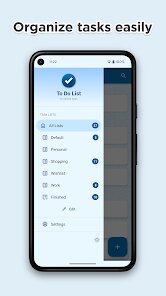
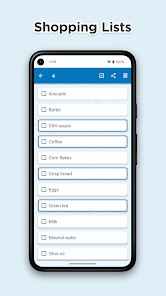
Expert Review
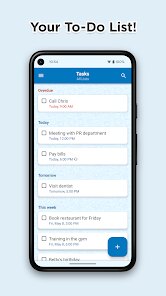
For anyone looking to organize their daily tasks, the calendar and planner section of Google Play hosts many options, and To Do List from Splend Apps is one that has gathered a steady user base. This is a straightforward task management application designed primarily for creating, organizing, and checking off personal to-do items and reminders. It is available as a free download, with a version supported by ads and optional in-app purchases that remove them, making it accessible without an upfront cost. The core functionality revolves around adding tasks with due dates and priority levels, then sorting them into lists that can be checked or unchecked as progress is made. Users can install it directly from Google Play and begin organizing within seconds.
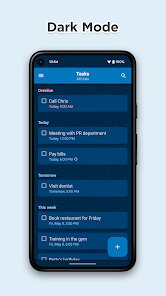
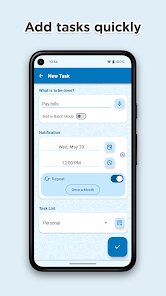
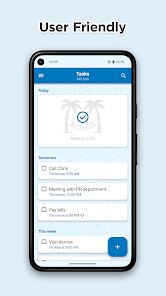
Getting started is quite simple: after the install, the main screen presents a clean list of pending tasks, and a prominent plus button lets you add new items. Tapping a task opens a panel where you can set a specific date, time, repeating intervals, and priority tags like high or low. You can also create separate categories for things like work, groceries, or personal errands, which keeps everything compartmentalized. What I noticed during use is that interaction is mostly based on tapping and swiping, which feels responsive but not overly smooth compared to some premium alternatives. The color-coded priorities help when scanning through a long list, though the visual design leans more toward functional than polished.
Compared to other task apps like TickTick or Todoist, this one strips away the complexity. Where those include collaboration features, habit trackers, or kanban boards, Splend Apps focuses purely on list-based task management. The interface here feels simpler and less cluttered, which I found helpful when I just needed a quick reminder tool without configuring many settings. However, the trade-off becomes clear in the lack of deeper organization methods like subtasks or tags, which similar apps handle more robustly. For users who prefer minimalism over feature density, this app works well, but those needing advanced planning might feel limited rather quickly.
Key Functional Highlights
- The reminder system struck me as one of the more reliable parts of the app. You can set alerts for specific times or recurring days, and the notifications arrive on time without delay. I tested this against Google Keep, and the accuracy was comparable, though the interface for adjusting repeat intervals takes a few more taps.
- I found the priority sorting to be functional but limited. Tasks labeled high priority appear at the top, and the color coding makes them stand out, but there is no way to sort by due date within the same view. Some apps like Any.do offer this as a standard feature, so it felt like a missing convenience.
- The search function works well enough for finding items across lists, though it does not support fuzzy matching. If your task title contains a typo, the results might not appear, which I noticed when searching for a misspelled grocery item. It does handle partial matches fine for correct entries.
- One aspect that stood out is how the app handles completed tasks. They remain visible in a separate section rather than disappearing entirely, which helps when you want to review what was done. Other tools often archive them automatically, so this manual approach gave me more control over review.
Advantages & Benefits
- I found it useful for quickly capturing ideas on the go because the add button is always visible and the process takes under a minute.
- The priority system helped me focus on urgent work tasks without digging through unrelated notes or lists.
- Recurring reminders for weekly chores like taking out the trash kept me consistent without needing to manually reset each time.
Areas for Improvement
- The ad-free version costs a bit more than some competing apps, which felt slightly overpriced for the feature set provided.
- There is no collaboration or shared list option, so group planning needs a separate solution entirely.
- I noticed occasional lag when switching between lists containing many items, particularly on older devices.
Recommended Apps
![]()
ZEPETO: Avatar, Connect & Play
Naver Z Corporation4.3
![]()
Reverse Voice: Flip Singing
NindaFuit0![]()
AI Chat Ask Assistant - NowAI
Now Tech4.3![]()
Lie Detector Test: Prank App
DkTech inc.4.3![]()
Peachy - AI Face & Body Editor
InShot Video Editor4.8
![]()
AI Video Art Creator - Livensa
FERASET4.5![]()
Google Voice
Google LLC4.3![]()
Horoscopes & Tarot
Astrolis Horoscopes4.7![]()
eBay online shopping & selling
eBay Mobile4.6![]()
JPay
Jpay Mobile4.1![]()
Stranger Things 5 Challenges
MVH Entertainment Team5![]()
Chat Master: Prank Story
ABI Game Studio4.8![]()
Google Maps
Google LLC4.2![]()
AI Chat・Ask Chatbot Assistant
AI Chat Studio4.5![]()
Name Meanings with Impact
Alif Innovative Solution3.7















You May Like
-
![]()
True Tarot Card Reading
KaApps4.2 -
![]()
LinkedIn: Jobs & Business News
LinkedIn4.2 -
![]()
iControl: Easy Widgets Themes
Fancy keyboard for theme apps4.6 -
![]()
Duolingo: Language & Chess
Duolingo4.7 -
![]()
Flipped:Chat with AI Character
First Group pte ltd4.1 -
![]()
Hearing Age
Mobile Solutions Tech0 -
![]()
TikTok
TikTok Pte. Ltd.4.4 -
![]()
Pretty Makeup - Beauty Camera
Photo Editor Perfect Corp.4.4 -
![]()
PhotoRoom AI Photo Editor
PhotoRoom Background Editor App4.7 -
![]()
Lightleap by Lightricks
Lightricks Ltd.4.3 -
![]()
Name Meaning
Dexati4.1 -
![]()
Truth Social
T Media Tech LLC3.3 -
![]()
Ace Hardware
Ace Hardware Corporation4.7 -
![]()
Kpop Fans Demon Hunter Wallpap
JHNStudio4.3 -
![]()
Artplay - AI Photo & Video
Hideaway Technology Limited4.5










































